Reverse Engineering the DigiTech RP Series Updater to Keep Legacy Hardware Alive
When I was 17, I had a DigiTech RP250 multi-effects pedal. Like a lot of teenagers getting into audio gear and software, I couldn't resist poking around to see how things worked. I fired up HTTP Debugger Pro while running the official firmware updater program (NetUpdater.exe), and I noticed it was calling out to DigiTech's servers to fetch an UpdateTargets.xml file.
Even back then, I remember thinking: what happens when they stop hosting this?
So, I decided to take matters into my own hands. I modified my Windows hosts file to point the firmware URLs to localhost, spun up an IIS server, and hosted the UpdateTargets.xml and the .DigBin firmware files myself. I successfully tricked the NetUpdater program into operating completely offline. It was a fun weekend project, and I eventually moved on.
Fast forward 9 years. I'm 26 now, and I recently bought a used DigiTech RP500 effects board. It shipped with firmware v1.2, but I knew that updating to v2.0 adds a highly useful looper feature. The problem? DigiTech has long since dropped support for these aging devices. They've completely discontinued the RP line, and worse, they scrubbed the firmware updater program from their website entirely.
Finding a copy of NetUpdater.exe was a major pain in the butt. After scouring the internet, I finally managed to track down a couple of copies—one buried in a Facebook group and another on archive.org.
Once I got my hands on the executable, I ran strings on it, hoping to see how it originally worked. Surprisingly, the URL to UpdateTargets.xml was still there, and even more surprisingly, the Lexicon/DigiTech servers were still hosting the .DigBin firmware files. They took down the updater, but left the backend infrastructure quietly running.
Knowing this wouldn't last forever, I did exactly what my 17-year-old self would have done: I ripped every single firmware bin file for every RP series device listed in that XML file.
But I didn't want to just stop at hoarding the files. I wanted to build a permanent solution. This is the story of how I reverse-engineered the Harman NetUpdater protocol and built a completely offline, standalone clone to ensure these pedals can be updated and restored forever.
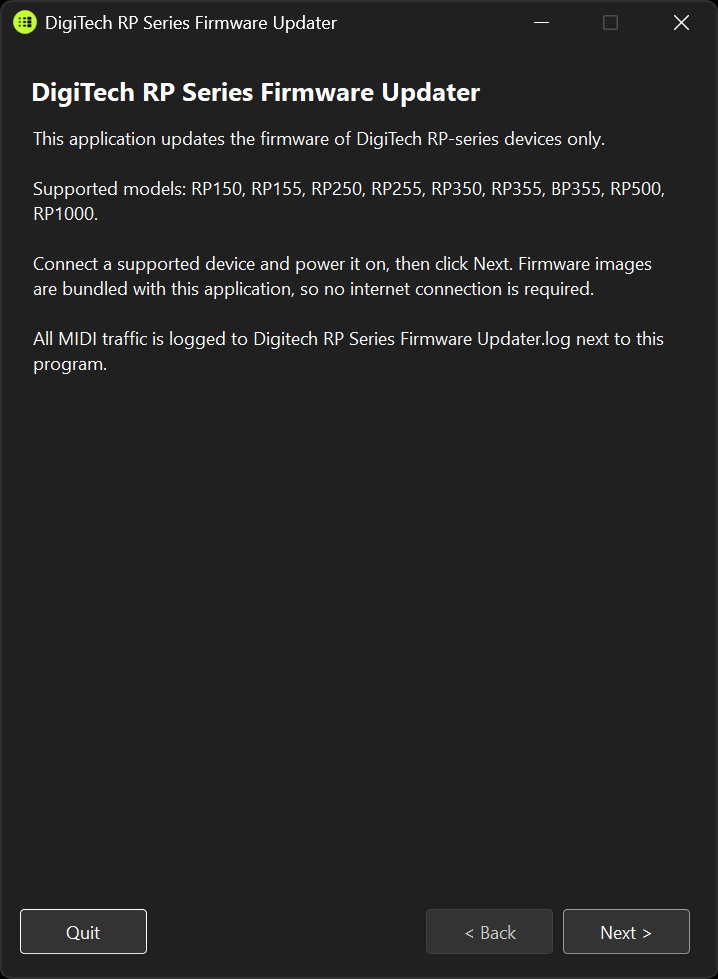 My standalone, offline firmware updater in action.
Dissecting the Harman NetUpdater
The goal of this project was to understand exactly how the original NetUpdater communicates with the pedals over USB-MIDI, and then replicate that behavior byte-for-byte in a modern C# application.
Here is a deep dive into the technical details of the update process, based on the reverse-engineering findings documented during this project.
1. The Blueprint: UpdateTargets.xml
Everything starts with the XML file. The original updater fetched this file (busting the cache by appending the local 12-hour time of day, e.g., ?nocache=2%3A04%3A53+pm).
This file acts as a map. It defines:
- Brands and Families: (e.g., DigiTech RP series =
FamilyID 0x5E). - Products: The specific pedal, along with a
ProductIDand anUpdateProductID. - Ports: The USB-MIDI input/output names the device exposes to the OS.
- Revisions: The available firmware versions, release dates, and URLs to the
.DigBinfiles.
Instead of downloading this over the internet, my clone embeds the XML and all the .DigBin files directly inside the executable, stripping out the reliance on the cloud entirely.
2. Device Discovery via USB-MIDI
Because these are guitar pedals, they communicate with the PC via standard USB-MIDI. The discovery process involves enumerating all MIDI input and output devices on the host machine.
The software checks if a connected MIDI device's name contains a substring matching one of the <Port> names in the XML (e.g., "DigiTech RP500"). If it finds a matching IN/OUT pair, it attempts to open a session and identify the device using SysEx (System Exclusive) messages.
3. The Harman "Super7" SysEx Protocol
All traffic to and from the device is wrapped in a proprietary SysEx envelope. Whether it's a Lexicon device (Brand 1) or a DigiTech device (Brand 2), the structure looks like this:
F0 <header> <raw0> <raw1> <raw2> <CMD> [7-bit-packed payload] <CHK> <F7>
- Header:
F0 06for Lexicon, orF0 00 00 10for DigiTech. - Raw Bytes:
raw0: The session byte (echoed by the device).raw1: TheFamilyIDfrom the XML.raw2: TheProductID(orUpdateProductIDif the device is already in bootloader mode).
- Command (
CMD): What we're asking the device to do. - Checksum (
CHK): A calculated XOR of every byte afterF0and before the checksum itself, masked to 7 bits. (Effectively making the XOR of the entire message equal to0x07).
Because MIDI data bytes cannot exceed 0x7F (the 8th bit is reserved for status bytes), the payload is 7-bit packed. Every group of 7 data bytes is preceded by a header byte that stores the 8th bits of those 7 bytes.
4. The .DigBin Firmware Format
The actual firmware files downloaded from the server have a .DigBin extension. Despite the proprietary extension, the format is quite simple:
- Offset 0: A magic little-endian DWORD:
00 5C 00 05(0x05005C00). - Offset 4 to EOF: A sequence of records containing:
uint32Flash Address (Big-Endian)uint32Size (Big-Endian)<Size>bytes of raw data.
There is no encryption and no CRC in the file itself. It is simply a map of data blocks to flash memory addresses.
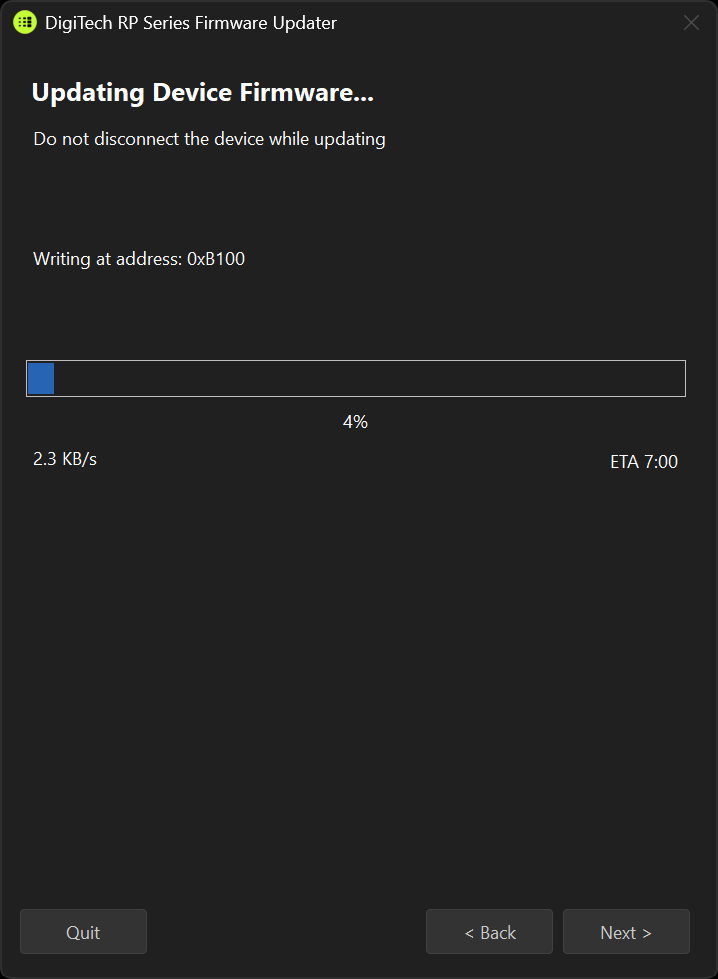 The updater parsing a .DigBin file and pushing data over SysEx.
5. The Flash Sequence (How it Writes)
Flashing a device sounds terrifying, but the protocol is actually surprisingly robust and safe by construction. The host application never blindly overwrites memory; it follows a strict handshake:
- Are you there? (
'q'): The host sends a0x71command. If it times out, the host assumes the device is already stuck in bootloader mode. - Enter Update Mode (
'{'): The host sends0x7Bto throw the device into update mode. - Flash Map Query (
'x'): The host sends0x78. The device responds with its maximum supported block size (usually around 64 bytes) and a table of memory segments (Addresses and Sizes) that are safe to write to. - Write Data (
'z'): The host loops through the.DigBinfile. For every address in the flash map, it sends chunks of data using the0x7Acommand.- If a block is entirely empty (
0xFF), the host skips it to save time and flash cycles. - If the device rejects a block (usually a transient error
0x0C), the host automatically retries up to 3 times.
- If a block is entirely empty (
Because the device's bootloader dictates the flash map and individually acknowledges (ACK) every single block, a malformed packet is rejected before it can corrupt anything. If you pull the USB cable mid-update, the pedal just stays in update mode. You just plug it back in and run the updater again.
Supported Models and the RP360 Exception
Before diving into the new software, I should clarify exactly which pedals this tool actually supports.
If you look at the raw UpdateTargets.xml file, you'll see a surprisingly long list of Lexicon and DigiTech gear. However, my clone is laser-focused on the RP series and its bass counterpart: the RP150, RP155, RP250, RP255, RP350, RP355, RP500, RP1000, and the BP355.
You might notice that the DigiTech RP360 is noticeably absent from that list, despite being an RP pedal. The reason comes down to the underlying protocol. The devices I support all rely on the Harman "Super7" SysEx format and .DigBin firmware files to receive updates. The RP360 was from a slightly later generation and relied on a completely different desktop program called Nexus. It simply doesn't speak the Super7 language. Several other products listed in the original XML also diverge from this standard.
Because of these architectural differences, I intentionally kept the scope of this project tight: if the pedal communicates via the Super7 SysEx format, it is supported.
Building the Clone
My replacement updater is a modern .NET/C# Windows Forms application that perfectly mimics the 10-page wizard of the original NetUpdater 1.0.1. I paid close attention to getting the UI flow, device display strings, and error messages to match the OEM experience.
If you decide to pull the source code and build it yourself, keep in mind that I brought the underlying tech stack fully up to date. You will need the .NET 10 SDK and desktop runtime, along with Visual Studio 2026, to compile the project.
Beyond preserving the old functionality, I added a few modern improvements:
- Fully Offline: The
UpdateTargets.xmland all.DigBinfiles for supported devices are compiled directly into the executable as embedded resources. You don't need an internet connection, and we don't have to worry about Lexicon's servers going offline. - Safe Test Mode (Dry Run): I added a checkbox that lets you run through the entire process—device discovery, handshaking, mode switching, and flash map querying—without sending any write commands. This is a great way to verify your USB-MIDI drivers are working without actually flashing the pedal.
- Detailed Logging: A rolling session log dumps every single hex byte sent and received over SysEx, complete with timestamps, making debugging driver issues significantly easier.
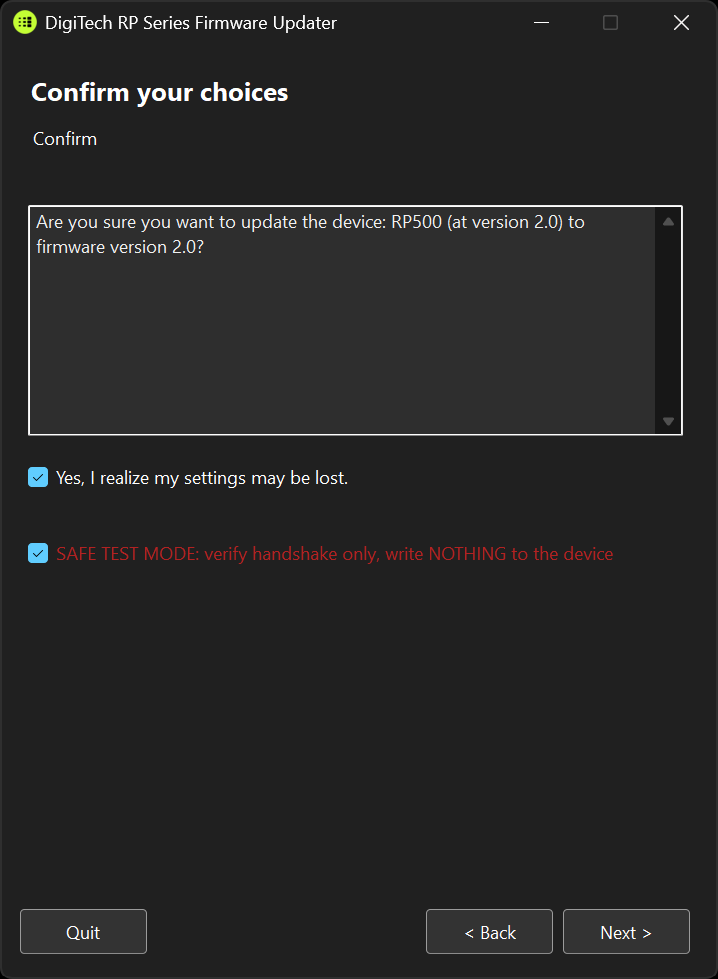 The confirmation page, featuring the newly added Safe Test Mode.
Conclusion
Abandonware is an unfortunate reality in the digital audio space. Hardware that sounds fantastic and functions perfectly can become useless simply because a manufacturer shuts down a server or stops updating a 32-bit Windows XP application.
By reverse-engineering the NetUpdater protocol and bundling the firmware files into a standalone, modern application, I'm hoping to keep the DigiTech RP series alive for a long time. Whether you have an RP150, BP355, or an RP500, you won't need to rely on dead links or modified hosts files anymore.
Your gear belongs to you, and now, so does the means to maintain it.
Get the Code & Releases
If you want to check out the source code, read the full NetUpdater_Protocol.md specification, or download the latest standalone release, I am hosting the project on both GitHub and Gitea. Grab the code or the pre-compiled binaries from whichever platform you prefer:
Terminal Logs
0 TransmissionsInitialize Transmission